


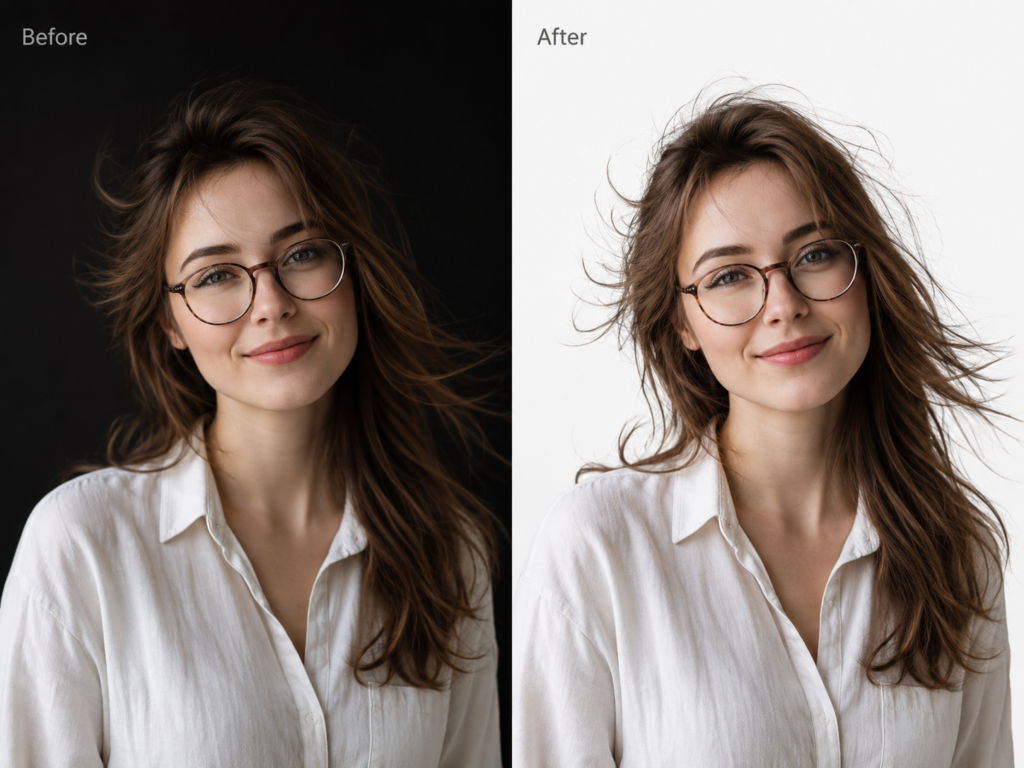
AI background removal in a photo booth gives you the same result as a green cloth, but without hanging one in the venue, without tuning the lights for it, and without a green fringe on blonde hair. For the operator that means less gear in the car and a shorter setup. For the guest it means a better photo. For the couple and the event stylist it means one less thing ruining the room.
Two hours before the guests arrive
A wedding venue, dark wood panelling on the walls, two hours until the guests turn up. If you work with a green screen, you know exactly what happens next. Bring in the cloth, assemble the frame, stretch the fabric so it has no creases, light it evenly, and find another five or six feet of clearance between the guest and the backdrop so the green does not bounce onto their clothes. That costs time, floor space and attention, and it only gets you to the point where you can take the first photo.
Fotillo does not have that step. Not because we swapped a green screen for something newer. We never had one. When we had to decide how to cut a person out of a photo, we deliberately skipped chroma key and went straight to an AI model. Here is why, and what it changes in practice.
Chroma key vs AI matting
A green screen works on a simple rule. The software compares the colour of every pixel against a target shade of green and removes whatever falls inside the tolerance. It does not know what a person is. It only knows what is green. That single limitation produces a list of failures every operator has lived through:
- uneven lighting, so the background is keyed in some spots and not in others,
- the guest’s shadow on the cloth, which becomes a hole in the replacement background,
- creases in the fabric, which come out as streaks on the print,
- green spill on blonde hair and white shirts,
- a green dress, a green tie or a green drink, all of which turn the guest partly transparent,
- hair, glasses and veils either cut off or surrounded by a halo,
- every new venue means retuning the threshold and the spill suppression.
An AI model asks a different question. Instead of checking whether a pixel is green, it asks whether the pixel belongs to the person. The answer is not a hard on-off mask but soft transparency, so a single strand of hair can be 40 per cent person and 60 per cent background. Everything else follows from that one difference. The wall behind the guest can be anything: brick, timber, strung with fairy lights, or simply full of other guests.
What people actually see in the room
This is the part nobody writes about, and the part your end clients notice first.
The stylist picks the colours for the whole wedding. Dusty pink, eucalyptus, gold, candlelight. Then a two-by-three-metre rectangle of bright green goes up in the corner. There is no hiding it. It shows up in guests’ phone photos, in Instagram stories and in the wedding photographer’s coverage. A green screen is meant to be a technical element that disappears from the picture, yet it is perfectly visible in the room.
Then there is the light. The cloth has to be lit hard, and the green bounces off it onto the nearest tables and faces. The photographer ends up working in a corner of the room with an unwanted coloured light source.
A Fotillo booth avoids all of this because it does not need any particular colour behind the guest. You can put it against the venue’s own wall, a flower wall, a curtain, wood panelling. You can still hang your own backdrop, only now you choose it to suit the event rather than to satisfy an algorithm. Navy drape for a corporate gala, pastels for a christening, deep bottle green for a botanical wedding. The backdrop stops fighting the decor and becomes part of it, and the software replaces it in the photo anyway.
You also get floor space back. No need for five or six feet of clearance, no need for lights aimed at the cloth. The booth fits into a narrower corner, which in small venues, restaurants and office lobbies can decide whether it fits at all.
What we did differently
Everyone says they have AI. Almost nobody says what decisions sit behind it, so here are ours.
We compute the mask from the original photo at full resolution, then composite at the size of the slot in the template. We take hair detail from where it actually exists and assemble it where assembly is cheap. The quality shows up on the print, and the guest does not pay for it in waiting time.
The model runs once per photo. The mask goes into a cache, and so do finished composites. Switching between backgrounds does not make the model work a second time, so the guest never waits twice for the same thing. The model itself is loaded once when the program starts and stays in memory, so nobody waits for several hundred megabytes to load mid-session.
Every failure ends in a photo, never in an error message. No model, not enough memory on the card, a timeout, an unexpected exception: in all of those cases the collage uses the original photo without the background swap and the session carries on. A photo booth at a wedding has no business showing a guest an error.
We run on the hardware you have, not the hardware you ought to have. We use DirectML rather than CUDA, so it works on NVIDIA, AMD and Intel graphics. The model comes in two sizes. The lite variant uses a 1024 px window and is happy with a modest card; the hr variant works at 2048 px and wants something in the GTX 1650 or RTX 3050 class. You pick the variant with a parameter or leave it to the automatic choice, and the approximate file sizes and memory requirements are listed alongside the models themselves. The fallback to CPU when memory runs out was added after we measured an out-of-memory error on an MX450 with 2 GB. The window size is read from the model metadata rather than hard-coded, so swapping in a newer model does not require a new version of the program.
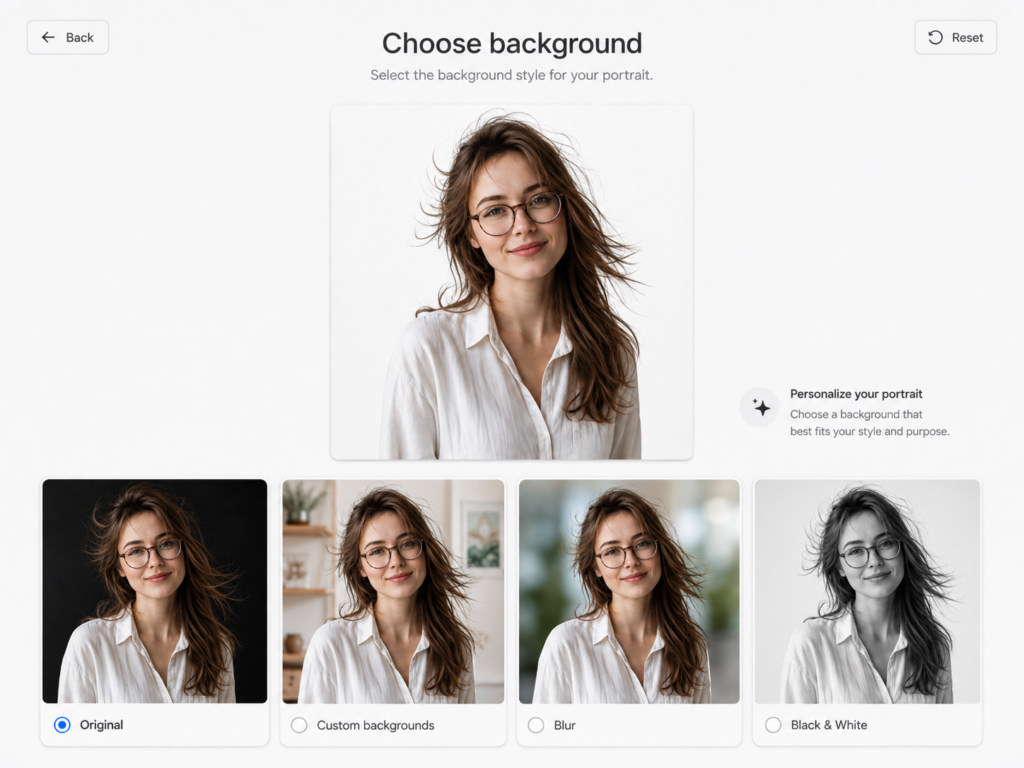
Two effects work without a single background file: a portrait-style background blur and a black-and-white background with the subject left in colour. Both come from the mask alone, so the client gets something usable before preparing any artwork. Custom backgrounds are simply JPG or PNG files dropped into the Background\ folder, with no tooling and no involvement from us.
We deliberately do not quote times in seconds here. The result depends on the graphics card, the model variant and the resolution of the photo, so any number taken from one machine would mislead anyone working on a different one. It is more honest to run a single session on your own computer and see how it behaves there.
Where the model comes from
We use BiRefNet by Peng Zheng and colleagues, described in “Bilateral Reference for High-Resolution Dichotomous Image Segmentation” (CAAI AIR 2024). We converted the weights to ONNX without changing them mathematically. The model is under the MIT licence, which covers both the code and the weights, and the author confirmed this to us in writing in 2026. The files are not in the installer; you download them from builder.fotillo.com/models/ into the Model\ folder, where you will also find the full attribution.
The honest limitations
AI mode requires a graphics card. On weaker hardware you need the lite variant, and we treat the CPU fallback as a safety net rather than a working mode. The model has to be downloaded once, and the two variants differ enough in size that on a poor connection it is worth doing before you leave rather than at the venue. The program runs on Windows 11.
A green screen still wins in one scenario: live video in real time on a stage with controlled lighting. It is deterministic and effectively free in computing terms, so if that is your use case, I would not push you to change.
On very unusual shots, several people with arms interlocked or an object held right in front of the face, the mask can lose detail. It is rare, but it happens.
The feature has to be switched on in the F4 configuration window, with the model downloaded. The parameters are covered in the chapter on photos and filters in the manual, so I am not repeating them here.
The cost, in the end
A green screen costs you at every single event: the gear, the transport, the floor space, the time spent setting up and tuning. AI background removal costs you once, when you download the model, plus the requirement for a decent graphics card. For a mobile photo booth that shifts the cost from logistics to hardware you are carrying anyway.
If you want to see how it behaves on your computer and your templates, get in touch. We will set up a call, tell you whether your card can handle the hr variant or whether it makes more sense to start with lite, and show you the result on your own photo before you decide anything.
