Na fotillo.com nie ma już przycisku pobierania. Jeżeli szukasz, gdzie pobrać program do fotobudki, idź na builder.fotillo.com. Zamiast jednego pliku dla wszystkich składasz tam własną paczkę Fotillo: wybierasz urządzenie, zaznaczasz funkcje, ustawiasz płatności, motyw graficzny i języki, a gotowy plik przychodzi na e-mail. Demo działa od razu po uruchomieniu.
Why the download button is gone
One file for everyone led to two bad outcomes. Either the customer got a program cluttered with features they had not paid for and could not switch on, or we had to maintain a dozen separate files and update them in two places at once. Every new release meant somebody had to remember to replace every variant. Sooner or later something on the server would be out of date.
The configurator solves that at the source, because it assembles the package only when you order it. There is no such thing as a stale package sitting on a server, because no package sits there at all. Maintaining two zones that both needed updating had stopped making sense, so we removed one of them.
If you arrived here from an old link, nothing has been lost. There are 69 redirects from the old addresses to the manual and to the product pages, so older articles and bookmarks still take you somewhere sensible.
What changes for you
Your package is always built on the latest release, because it is created at the moment you order it.
It contains only what you pay for. The program does not display features you have not bought, so your staff never have to work out what is active and what is not.
It arrives already configured for your hardware, your currency and the way you take payment. That last part is the most underrated, and in practice it saves the most time on site.
How it works
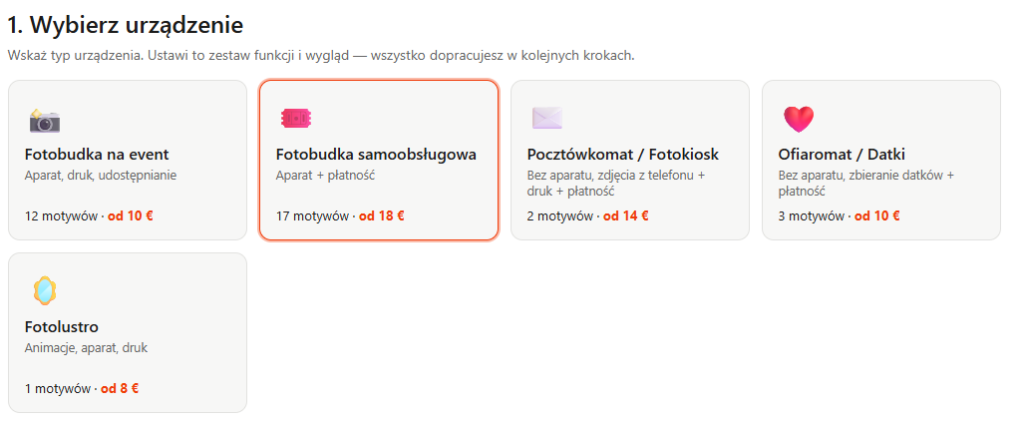
Device. You start with the question of what you are building, not with a list of features. The options are an event photo booth, a self-service photo booth, a postcard kiosk, a donation kiosk and a photo mirror. That choice shapes the rest of the wizard.
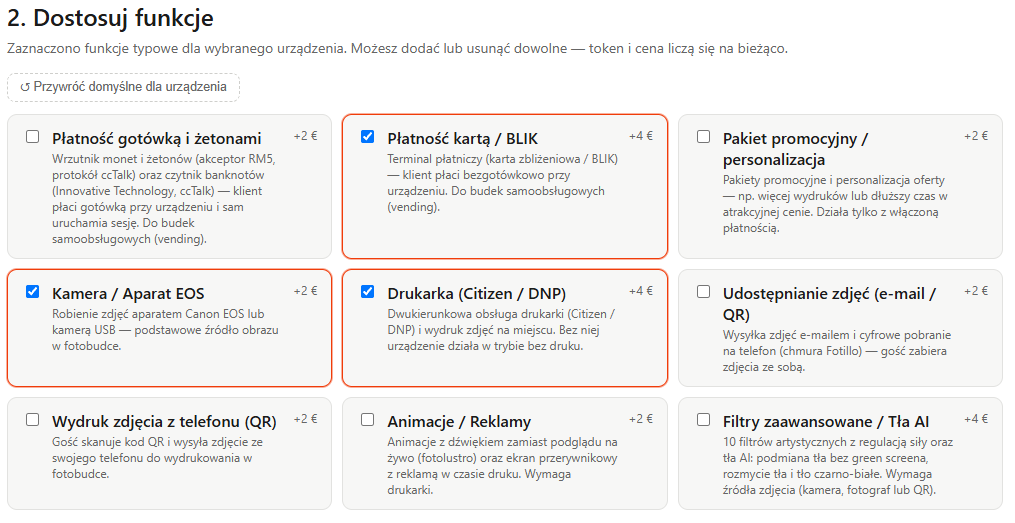
Features. You tick what you actually need, and the configurator enforces the dependencies. Advertising can only be enabled together with a printer, the promotional package only with the payment module, and the photo mirror has camera, printer and animations built in permanently. You cannot assemble a set that has no chance of working. The price recalculates as you click, so you see the cost of every decision straight away, without a PDF price list and without emailing a salesperson.
Payment setup. This step only appears if you selected the payment module. You enter your company details for the report, the VAT rate, the time of the daily report, the currency and number format, prices and packages, the coin and bill acceptor channels, and the card terminal thresholds.
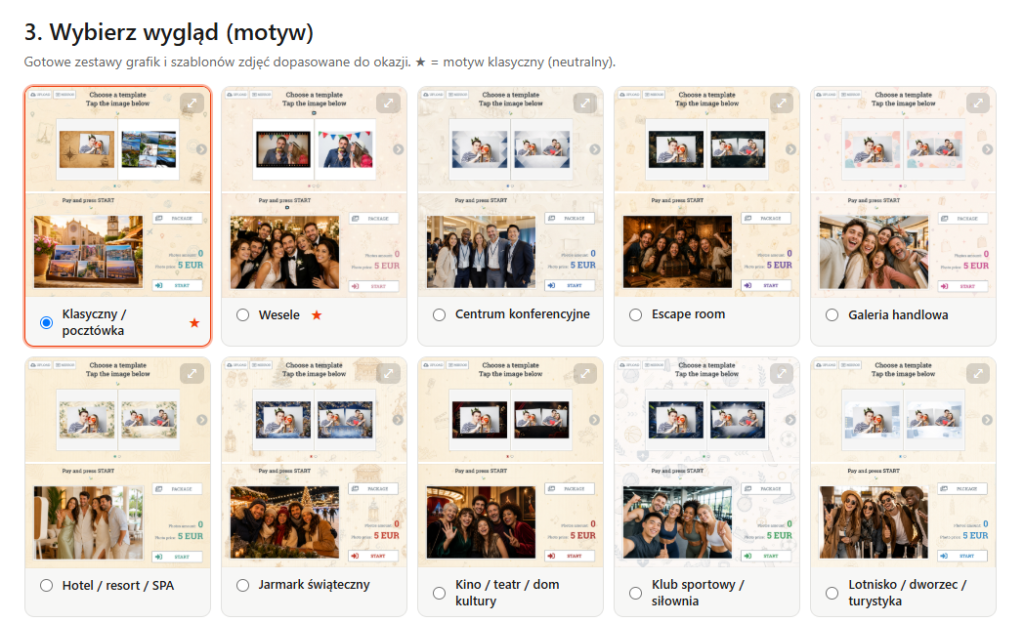
Theme. There are 34 themes matched to occasions and venues: weddings, first communions, Halloween, Christmas, shopping centres, hotels, zoos, escape rooms. Each comes with a preview of the collages and the start screen, so you see the result before you order.
Languages and delivery. You choose a default language and any combination of extras from thirteen. They all go into a single package; there are no separate downloads per language. At the end you receive an individual download link by email, valid for one day.
You can save the configuration to a JSON file. Next time you load it instead of filling in the form again, which matters if you run several booths.
How many combinations that adds up to
We did not estimate this. We reproduced the configurator’s own logic: the list of available features, the mandatory and hidden features for each device, and the dependencies between them.
The starting point is five devices and ten paid features to choose from. There are 702 valid feature sets, meaning sets that pass dependency validation, and they correspond to 342 different programs counted as unique licence tokens. Adding the theme brings that to 6,706 variants, where a variant is a device with a specific feature set and a specific theme. Language sets, meaning one default language out of thirteen plus any subset of the rest, come to 53,248. Together that gives 357,081,088 different packages, and each of those is a different installer rather than a different setting inside the same program.
Broken down by device:
| Device | Features to choose | Valid sets | Themes | Variants |
|---|---|---|---|---|
| Self-service photo booth | 9 | 294 | 17 | 4,998 |
| Postcard kiosk / photo kiosk | 9 | 294 | 2 | 588 |
| Event photo booth | 7 | 90 | 12 | 1,080 |
| Donation kiosk | 3 | 8 | 3 | 24 |
| Photo mirror | 4, three of them mandatory | 16 | 1 | 16 |
There are 34 themes but 35 assignments to devices, because one theme serves two devices.
Ready-made packages, if you would rather not configure anything
Not everyone wants to go through a wizard. We have prepared eleven ready-made sets as starting points, and you can still modify them afterwards.
For getting started and for events there are four camera-based options. FreeBooth is camera plus printing, the simplest booth for a first run. PhotoBooth adds sharing and printing of a photo sent from a phone. BoxBooth adds animations and advertising instead. SharingBooth drops the printer entirely and focuses on sharing, which makes sense wherever online reach matters more than paper. Alongside those, EventPrint is a printing station that pulls the photographer’s shots from a folder and adds a QR code, and PhotoMirror is the photo mirror version, where animations play instead of a live preview.
The self-service sets are the ones that pay for themselves. PhotoBooth-Vending is the full stack: cash, card, camera, printing, sharing, QR and advertising. CardPrint-Vending is a kiosk with no camera, where the customer sends a photo from their phone and pays for the print. PhotoKiosk-Vending handles card payment together with the promotional package, and DonationKiosk collects donations and needs no camera at all.
One thing is worth clearing up here, because it does confuse people. PostcardBooth-Vending and PhotoBooth-Vending are the same licence token, 13852. They differ in theme and in the wording used in the interface. The token describes what the program does, the package describes how it looks and what it calls things, so two packages with different names can have identical capabilities.
Activation codes and non-standard sets
The demo works as soon as you download it. You install it, test it, and only then decide. The activation code is bought separately, and the program itself displays the hardware identification number the code is generated from.
One honest note here. The configurator will build 342 different programs, but a ready activation code can be bought off the shelf for 47 of them. Those are the most frequently ordered sets. If yours falls outside that list, you fill in an enquiry form instead of using the basket and receive an individual quote. We would rather you knew that now than discovered it at checkout.
Where to start
Go to builder.fotillo.com, pick a device and click through the features. The price moves as you go, so you can get a sense of the cost without talking to anyone. You can download and run the demo the same day.
If you would like to look at how the program works in more detail first, the manual is available in thirteen languages at builder.fotillo.com/manual, and the AI models are at builder.fotillo.com/models/. And if you are not sure which device and which features suit your idea for the business, get in touch. We will work through it with you.
